Google Analytics Spam: How It Got Into My Account
Spam links appeared beside my real projects in Google Analytics. Here's how account sharing caused it, what I removed, and where Google blocked the cleanup.
On October 13, 2026, I noticed something strange in Google Analytics. I opened the account picker and saw spam messages mixed with projects I knew: Karaoke Captions, parish.cv, and RetinaDesk.
One entry said “Tap here to chat free now.” Another offered local dating links. The account names contained shortened URLs. I wanted to know how they got there, whether someone had access to my real projects, and how to get rid of them.
The investigation found eight spam accounts. I could leave one. The other seven were already in Trash, and Google blocked the normal removal controls. This is what happened and what you can try if you see the same thing.
Checked in my Google Analytics account using Chrome on October 13 and 14, 2026. Screenshots show the real interface, cropped to leave out my email and traffic reports.
On this page
- What I noticed
- How account-sharing spam works
- What I checked for unauthorized access
- How to remove an unwanted account
- Why seven entries are still there
- Can we prevent this?
- An open letter to Google
What I noticed in Google Analytics
The spam appeared in the list used to switch between Analytics accounts. It wasn't a strange referral in a traffic report or a page on one of my websites. Each message was the name of a separate account I could access.
That difference matters. In Analytics, an account holds one or more properties. A property usually collects data for a website or an app. My Google login can have access to several accounts, including accounts owned by other people.
The list looked personal because it sat beside my own projects. But appearing under my login didn't mean I had created every item in it.
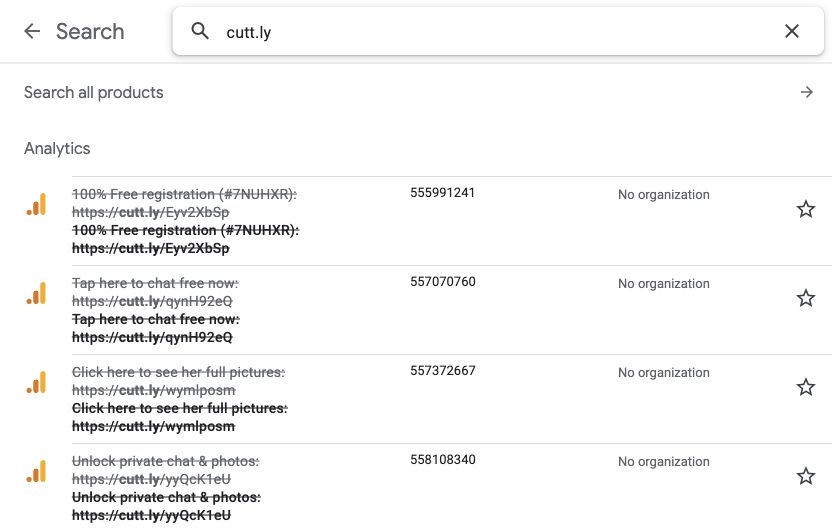
This screenshot was taken after the cleanup attempt. Searching the shortened-link domain still found seven entries. Four are visible here. The crossed-out text marks deleted items that remained in the picker.
I didn't open the shortened links. Opening an account's settings inside Google Analytics was enough to investigate.
How Google Analytics account-sharing spam works
Google's user-management documentation explains that an administrator can add someone to an Analytics account or property using their Google email address. The administrator can also ask Google to send an email notice.
That sharing feature explains how an unrelated account can appear under my login. The evidence in my case points to someone adding my email to accounts with spam messages in their names.
The account name becomes the advertisement. Google then displays it inside its own dashboard. An access notice can also carry that name into someone's inbox. I found the spam in Analytics; I didn't investigate email delivery in this case.
The person granting access doesn't need my password to share their own account with me. Also, giving me access to their account doesn't automatically give them access to mine.
I couldn't establish who originally added me or when each access grant happened. I also don't know where they got my email address. Calling this account-sharing spam describes the behavior I could verify without guessing about the sender.
What I checked for unauthorized access
Before removing anything, I checked a project I recognized: Karaoke Captions.
Its Account access management list contained only me as Administrator. Its Property access management list also contained only me. I then reviewed all 31 available records in Account change history. Each change was attributed to my email or Google's system.
I found no unfamiliar users or changes in that project. That was reassuring, but it wasn't a full security audit of every website or my whole Google account.
If this happens to you, check both access lists on your real projects. A person may have access to a single property without having access to the whole Analytics account. Treat an unfamiliar person on a real project's access list as a separate issue that needs investigation.
The unexpected account names alone don't prove that someone has logged into your Google account. If you also notice unknown devices or security alerts, use Google's Security Checkup.
How to remove an unwanted Analytics account
The useful action is to remove your access to the unwanted account. You don't need to own it or delete its data.
First, use the account picker to select the unfamiliar account. Check its name before continuing. You want to leave the spam account, not your own project.
Then:
- Open Admin, using the gear icon in the left menu.
- Under Account, open Account access management.
- Find your own access. In the spam account I could leave, the page showed my name and a Remove myself button. Some layouts put the self-removal action in a menu beside your own row.
- Choose that action. Read the confirmation and check which account it names.
- Confirm Remove, then refresh Analytics and check the account picker again.
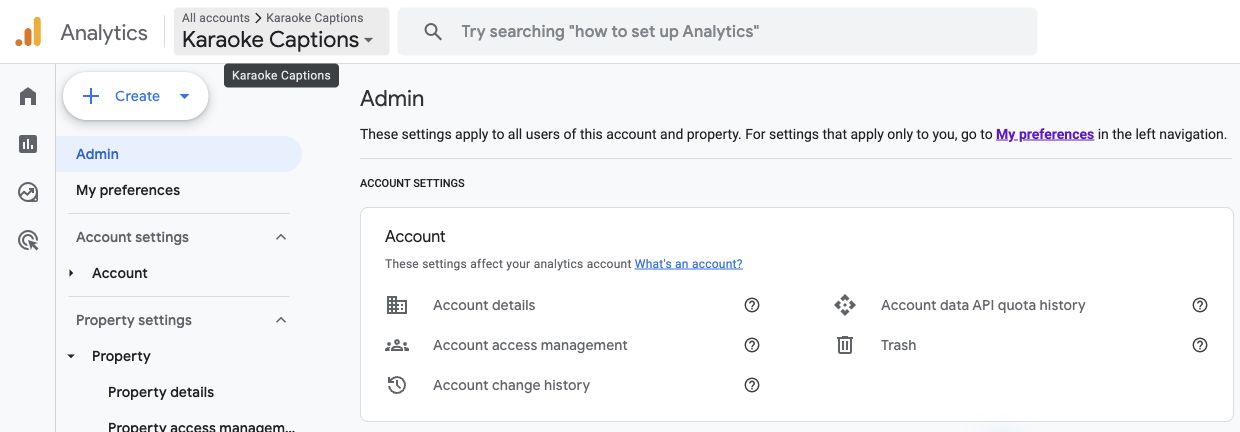
This is the menu location on my legitimate project. For cleanup, select the unwanted account first. I used this same menu to reach the spam account's self-removal button.
One spam account said I didn't have permission to manage its users. Even so, it showed Remove myself because I had direct access. That button let me leave without asking the owner for a higher role.
After removing myself, the old picker briefly still showed the account. A full refresh cleared the old view. When I tried to open the removed account again, Google displayed Missing permissions. A fresh search also stopped returning it.
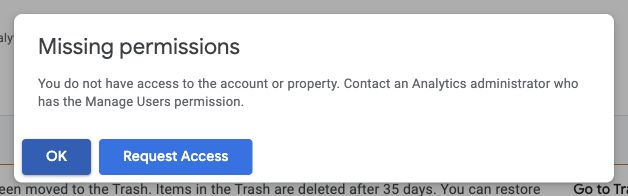
In this case, the error was the result I wanted: I had left the spam account. This message on its own doesn't prove a successful removal; I checked it after the Remove action and a refresh.
For access shared only at property level, check Property access management as well. If your access comes through a group, leaving may require a different route. My successful removal was for direct access to an account.
Don't remove yourself from a project you need. You may need another administrator to add you back. Google also prevents the last Administrator from removing themselves.
Why seven spam entries are still there
The other seven accounts were already marked deleted when I investigated. I hadn't put them in Trash, and I couldn't establish who had.
On the trashed accounts I inspected, the normal management links were unavailable. Opening the access-management page directly produced a Trashed account message. It told me to contact an administrator to restore the account before deletion.
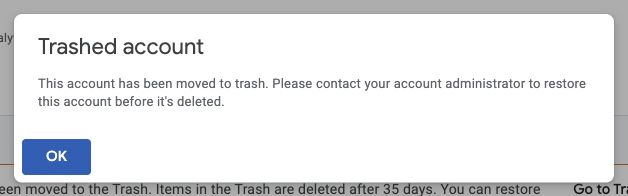
This was the blocker on a spam account that still appeared in my picker. I couldn't reach its normal self-removal controls.
I also checked Google Marketing Platform's account-management screen. It didn't offer a self-removal option for the trashed account I inspected there.
Google documents a 35-day Trash period, followed by permanent deletion. Those 35 days start when an item enters Trash, not when I notice it. I couldn't see the deletion dates, so I can't promise a date when these entries will disappear.
I left them in Trash. I didn't restore an unwanted account just to try to leave it.
If you hit this restriction, keep the account IDs and a screenshot of the message. Use Send feedback in Analytics to describe the problem, or try Google Analytics support. Explain that the spam account is already in Trash and you cannot reach Remove myself. Neither route guarantees an immediate fix; I haven't received one from Google.
Can we prevent strangers from adding us?
I couldn't find an Analytics setting that requires my approval before an unknown account is added to my list.
In an October 2026 Google Analytics community reply, a Product Expert says users cannot prevent these additions and can only remove themselves afterward. Product Experts are community volunteers; this is guidance from the help forum, not a promise from Google's engineering team.
Removing one account also doesn't prevent someone from sharing a different account with the same email later. I can clean up what I can access, check my real projects, and report the problem. I don't have a complete prevention switch to turn on.
Changing a password or enabling two-step verification protects login access. It doesn't address this sharing behavior, because the sender can share their own resource without signing in as me.
This experience also reminded me of something I wrote about in the fake DeepSeek site that appeared in Google Search: a familiar Google interface can display something I shouldn't trust. I still need to check who supplied it.
An open letter to the Google Analytics team
Dear Google Analytics team,
I use Analytics to understand the projects I build. On October 13, I found dating messages and shortened links mixed into the list of accounts under my login.
I could remove one account. Seven were already marked deleted and still appeared in the list. On the trashed accounts I inspected, the tool blocked access management and suggested contacting an administrator to restore the account.
Please give the person receiving unwanted access a way to reject it, including when the resource is in Trash. Leaving should not depend on help from the owner of a spam account.
Here are the controls I would like to see:
- Approval for unknown senders. Put new access grants in a pending list until I accept them. Let organizations keep a simpler flow for trusted colleagues.
- Leave and report from the picker. Let me remove an unwanted entry and report it in the place where I first see it.
- Self-removal from trashed resources. I should be able to leave even when the owner has marked an account for deletion.
- Bulk cleanup and sender blocking. Let me select several unwanted accounts and block repeated additions from the same source.
- Clear sharing details. Show who added me and when. Make it clear that the account name was supplied by another user.
These are product requests, not features I found in the current interface.
I understand why teams need easy account sharing. I also need control over which strangers can place messages in my account list. A shared resource should be easy to decline.
Please make that part of Analytics easier.
Parish Khan
How this post was prepared: I investigated my own Analytics account with help from an AI assistant. The numbers, UI labels, and removal result come from that session. The screenshots were captured in Chrome. The remaining seven entries were checked again on October 14, 2026.