I Put a Mosque's Prayer Clock Inside ChatGPT
SalahClock runs prayer-time displays on mosque walls. I gave it an MCP server so an imam can change the wall by asking — and then spent longer on the directory review than on the server itself.
SalahClock puts prayer times on a screen in a mosque. A cheap Android stick or an old laptop, a TV on the wall of the prayer hall, and a dashboard where whoever runs the mosque sets the calculation method, the iqamah offsets, the announcement banner.
The dashboard is fine. It is also the part nobody wants to open at 9pm on a Thursday because Jumu'ah moved fifteen minutes earlier this week.
So I gave it an MCP server. Now the same person opens ChatGPT and types "set Isha iqamah to 15 minutes after the adhan", and the TV on the wall changes about a second later.
This is what that took, and what the ChatGPT directory review made me fix before it would let me through.
The shape of it
The MCP server is not a separate service. It is one route in the existing Next.js app —
app/mcp/route.ts — deployed to Cloudflare Workers with the rest of the site. Streamable HTTP,
stateless, no session store, because a Worker has nowhere to keep one.
Twenty-two tools: six that read, sixteen that write.

The left half of that diagram happens once. The right half happens every time someone asks.
The 401 is the documentation
The bit that surprised me: you do not tell ChatGPT where your login lives. You tell it by refusing it properly.
An unauthenticated call gets a real 401 with a WWW-Authenticate header pointing at your
protected-resource metadata (RFC 9728). The client reads that, finds the authorization server,
registers itself, and runs the OAuth flow. Nobody types a client ID anywhere.
/**
 * `withMcpAuth` produces the RFC 9728 challenge — a real 401 carrying
 * `WWW-Authenticate: Bearer resource_metadata=…` — which is how Claude and
 * ChatGPT discover where to send the user to sign in. Returning a tool error
 * instead would leave the client with no way to start the OAuth flow.
 */
The tempting thing here is to be helpful: return a tool result that politely says "you're not signed in". That is a dead end — the client has nothing to act on. A 401 with the right header reads as ruder and is the friendlier answer.
I did not write an authorization model
Supabase shipped an OAuth 2.1 server. The access token it mints is an ordinary Supabase JWT, which means the client I build with it runs every query as that user, and every row level security policy I already had applies unchanged.
That is a very large amount of work I got to not do. There is no second authorization model to keep in sync with the first one, which is the usual way these things rot.
There is one sharp edge, and it is sharp enough that it has its own paragraph in the file header:
// The load-bearing check. See the file header: without this, a website
// session cookie would authenticate against the MCP endpoint.
if (!clientId) {
  throw new McpAuthError(
    "This endpoint only accepts tokens issued to a connected app. Connect " +
    "SalahClock from your assistant rather than pasting a session token.",
  );
}
client_id is present on OAuth-server tokens and absent on browser sessions. Same signing key, same
issuer, same sub — one claim is the whole difference between "an app the user connected" and "a
session cookie someone lifted". Pin the issuer too, or a token from any other Supabase project walks
in.
The consent screen is the product
Supabase owns the OAuth protocol but ships no consent UI, which turned out to be a gift. OIDC scopes
can say openid email profile. They cannot say which mosque an assistant may edit.
So the consent screen is mine, and it asks the two questions that actually matter.
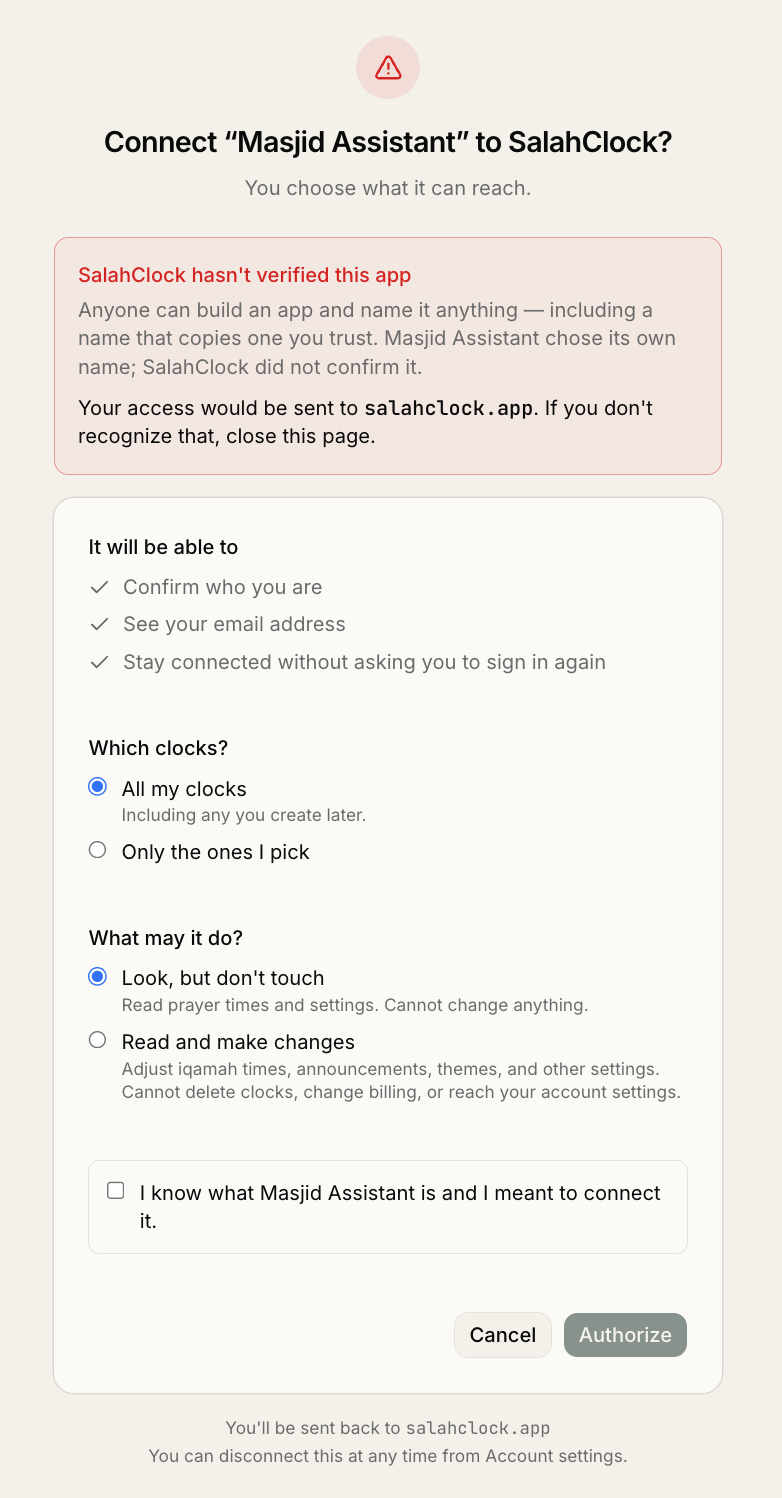
Note which radio is pre-selected under What may it do?. That is not an accident, and the comment in the component says why:
// Defaults to read-only on purpose: whichever option is pre-selected is what
// someone who clicks Authorize without reading ends up granting, so it must
// be the safer one. Each radio below carries an explicit `value` — React
// needs it to control a radio group reliably, and without it hydration
// settled on the *second* option, silently defaulting this to write access.
const [canWrite, setCanWrite] = useState(false);
That second half is a bug that lived in the branch for a while. Two controlled radios without
value attributes, and hydration landed on the wrong one — so the "safe" default was quietly
granting write access to every clock on the account. It looked correct in every screenshot.
The answer becomes a row in agent_grants, keyed by the OAuth client_id. Every write tool starts
by asserting against it, so a read-only grant gets a clear refusal rather than a tool that
mysteriously vanished from the list.
Anyone can register a client called "Claude"
Dynamic client registration is what makes "paste this URL into ChatGPT" work. It also means
Supabase's registration endpoint is public: anyone can register an OAuth client, with any
client_name they like, pointing at any redirect URI they control.
Which means anyone can send a mosque admin a link that lands on my real consent screen, correct domain, valid certificate, genuine flow, cheerfully asking "Connect Claude to SalahClock?" — and the authorization code goes to the attacker.
The fix rests on one observation: the name is attacker-chosen, the redirect host is not. Whoever
receives the code has to control the host it is sent to. So trust comes from the redirect host and
never from the name, and the name is treated as hostile text — including a confusables fold, because
Clаude with a Cyrillic а is indistinguishable to a human and trivially distinguishable to a
Record<string, string>.
I found out it works by accident. I was building the screenshot above and needed a second one, so I registered a throwaway client called "ChatGPT" pointing back at my own domain. My own app refused to show me a consent screen at all:
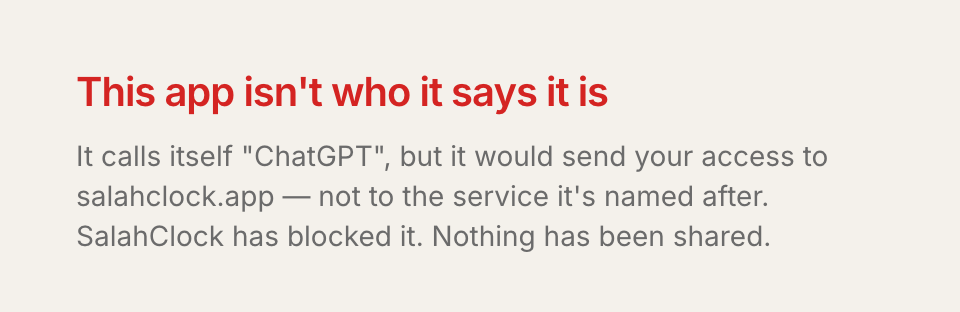
Being blocked by code I wrote a few days earlier is a strange feeling. Recommended.
Answer the question that was asked
MCP lets a tool return an inline UI resource, so get_prayer_times renders a card. First version
always returned the whole day:
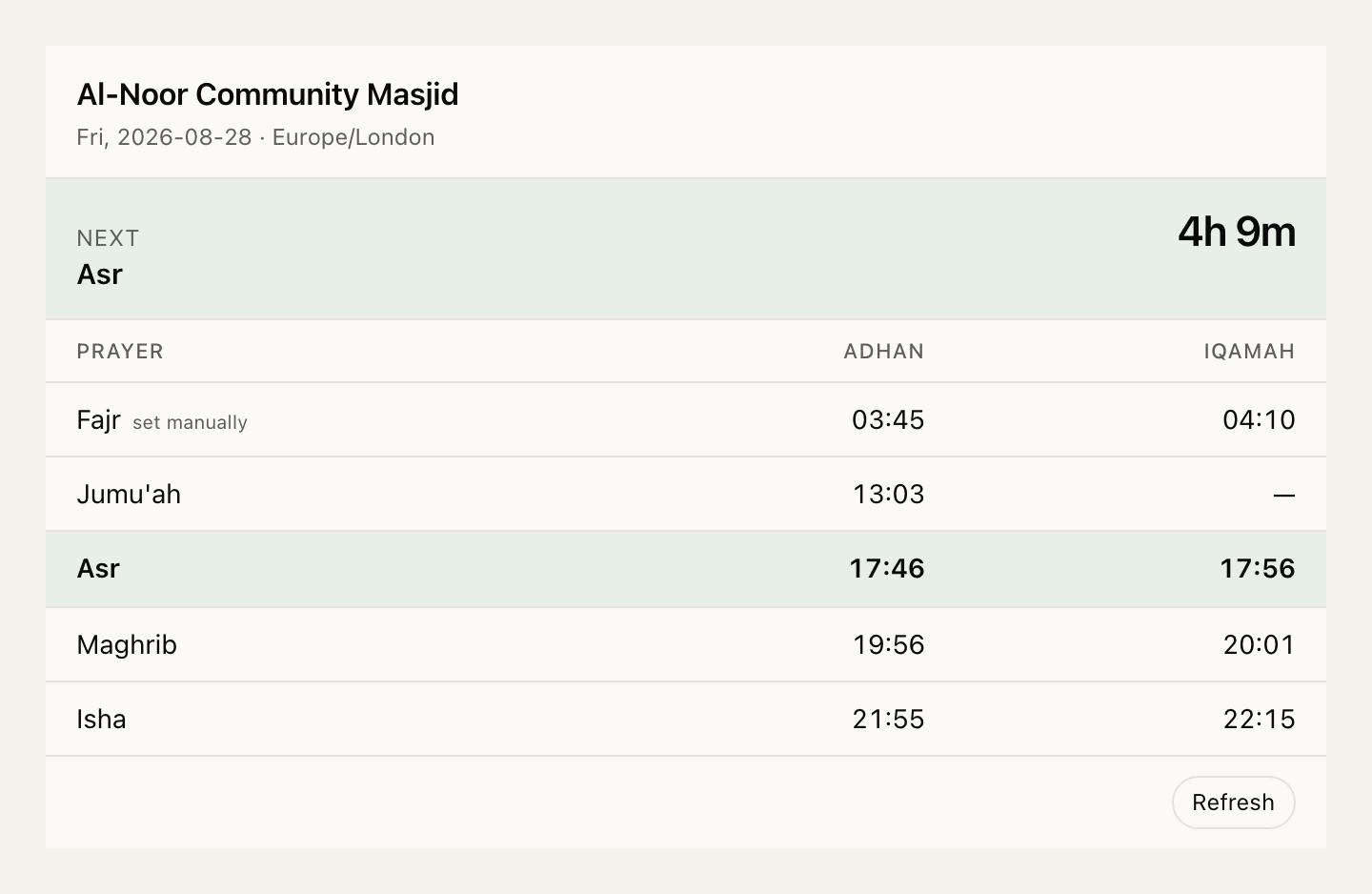
Which is wrong when the question was "what time is Fajr tomorrow". You asked about one thing and got six rows, one of which is your answer.
So the tool takes an optional prayer, and the card collapses to it:
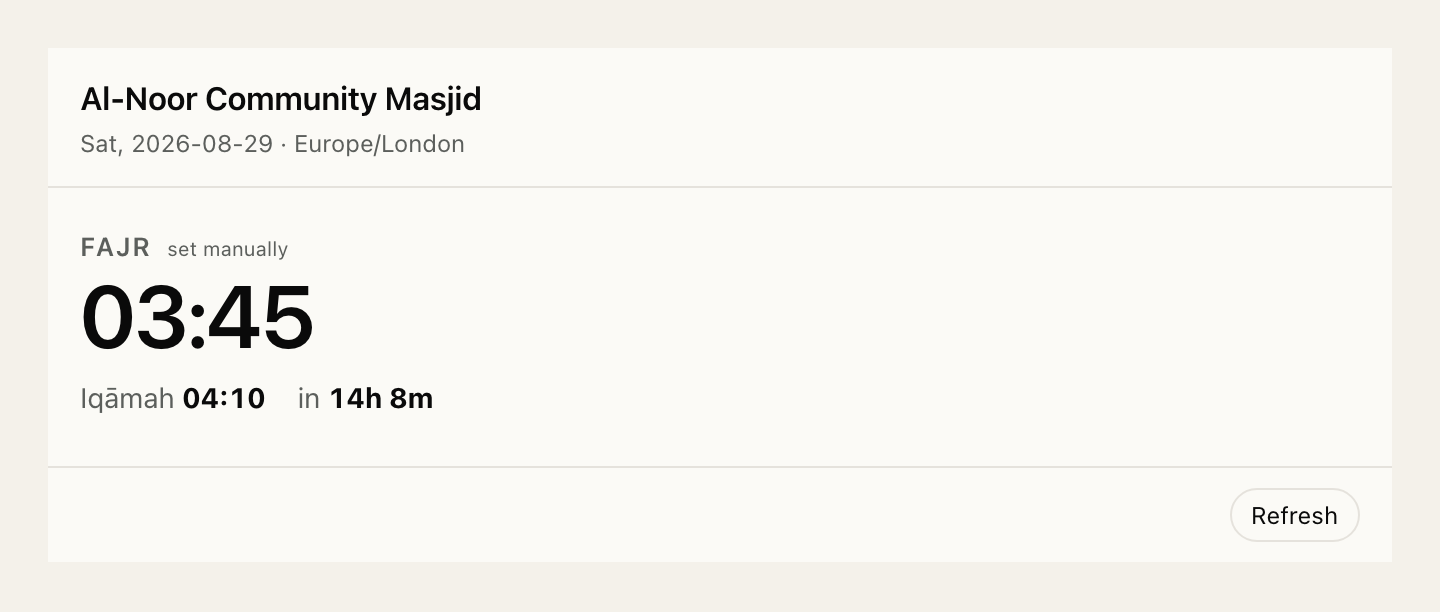
The interesting case is Friday. Jumu'ah takes Dhuhr's place on the day it falls, so asking for Dhuhr on a Friday should answer with Jumu'ah, not with "there isn't one":
// Dhuhr and Jumu'ah are the same slot in the day's schedule, and which one
// applies depends on the weekday. Asking for "Dhuhr" on a Friday should
// answer with Jumu'ah rather than with nothing — the person wants the midday
// prayer, whatever it is called that day.
const wanted = prayer === skip ? (skip === "dhuhr" ? "jummah" : "dhuhr") : prayer;
A related one that took longer to see: prayer times were computing off by a day for some mosques. Workers run in UTC, and the astronomical calculation was being handed an instant instead of a calendar day anchored on local noon — so anywhere far enough east or west, "today" was somebody else's today. The fix is one argument, plus a comment shouting at whoever touches it next:
// computeDay takes a day OFFSET, not a date, and internally anchors on
// local noon so the calendar day is right regardless of the runtime
// timezone (Workers run UTC). Never hand it a constructed instant.
const day = computeDay(source, from + i, new Date());
Then the directory review
This is the part I underestimated. The server had been working in Claude for days before I filled in OpenAI's submission form, and the form found things that working software does not.
Every one of my 22 tools was flagged. Read tools "did not include an annotation for
destructiveHint". Write tools "did not include an annotation for readOnlyHint". I had labelled
each tool with the hint that was true for it:
annotations: {
  title: "List clocks",
  readOnlyHint: true,
  openWorldHint: false,
},
The scanner does not infer the default. An omitted annotation is a missing annotation, and it will not take the submission until you say the boring half out loud:
annotations: {
  title: "List clocks",
  readOnlyHint: true,
  destructiveHint: false,   // ← this
  openWorldHint: false,
},
Twenty-two tools, one mechanical fix. The interesting move was afterwards: I turned the review criterion into a test, so the next version cannot regress it in a place nobody looks.
it.each(tools.map((t) => [t.name, t] as const))(
  "%s declares both readOnlyHint and destructiveHint, and they disagree",
  (_name, tool) => {
    const a = tool.config.annotations ?? {};
    expect(typeof a.readOnlyHint).toBe("boolean");
    expect(typeof a.destructiveHint).toBe("boolean");
    // A tool claiming both, or neither, describes nothing.
    expect(a.readOnlyHint).toBe(!a.destructiveHint);
  },
);
That file now also asserts tool names are snake_case and under 64 characters, descriptions are specific enough to review, and — the one I like most — that no description contains language that reads as instructions to the model rather than description of the tool:
const INJECTION_PATTERNS = [
  /\byou (?:must|should|will|need to)\b/i,
  /\balways call\b/i,
  /\bignore (?:the |all |any )?(?:previous|prior|above)\b/i,
  /\bsystem prompt\b/i,
  /\binstead of (?:using|calling)\b/i,
];
"Always call this tool first" is an automatic rejection, and it is exactly the kind of thing that
sneaks in while you are trying to make a model behave. Now npm test catches it at commit time
instead of a reviewer catching it three weeks later.
The recommendation I nearly ignored
Twenty-one of the tools also carried a softer note: add an outputSchema so models can better
understand this tool's results. Advisory, not fatal. I nearly shipped without it.
Adding them was worth it for a reason that has nothing to do with the directory. Declaring an
outputSchema binds the handler — every success path must then return structuredContent in
that shape, and the host rejects the call if it does not.
Which immediately exposed a latent bug. get_prayer_times had declared a schema since the card
shipped, but one branch — you asked for a prayer that does not fall in the range you asked about —
returned plain text and no structured content. That branch had been live and broken since the card
shipped, quietly, and nothing in my test suite had an opinion about it.
For the sixteen write tools I used one shared shape rather than sixteen bespoke ones:
const WRITE_OUTPUT = {
  clock: z.object({ name: z.string(), slug: z.string() }),
  changed: z.array(z.string()).describe("The settings this call actually wrote."),
  summary: z.string().describe("The same sentence as the text content."),
};
A model calling these does not want a different result object per setting. It wants to know which clock was touched, what actually changed, and what to say back.
Things that ate an afternoon
- The tool-justification fields cap at 200 characters. There are 66 of them — 22 tools times three annotations — and you write each one by hand explaining why that annotation is accurate. Budget an hour and write them from what the handler actually does, not from the tool description.
- Screenshots are all-or-nothing. Add one to a prompt and the form demands one for every prompt. Exactly 706px wide, 400–860 high, showing the widget with no prompt text baked in — the portal draws the chat bubble itself.
- The reviewer will click straight through your consent screen. Mine defaults to read-only, on purpose, which means a reviewer who does not read it would have failed both of my write test cases and reported the connector as broken. That warning is now the loudest line in my test credentials.
- Cloudflare's bot protection does not like Python. My verification script got
1010 browser_signature_bannedfor twenty minutes before I noticed the only difference between it and thecurlthat worked was the User-Agent.
Would I do it again
Yes, and sooner. The MCP server is about 2,700 lines including comments, with nearly as much again in tests, and most of the real work was decisions rather than code: what a tool should be named, what it should refuse, what the safer default is when someone clicks Authorize without reading.
The rest of it is a 401 with a good header.
If you are building one: write the consent screen yourself even when the protocol does not make you,
put the directory's review criteria in your test suite the day you read them, and add the
outputSchema you were going to skip. It will find a bug.