How to Integrate the WhatsApp API in Your Website
How I built a WhatsApp chat on my website with Meta's Cloud API: setup, webhook, the 24-hour window, pricing, voice notes, and the limits nobody mentions.
On parish.cv, a visitor can open a chat bubble, type a message, and carry on the same conversation in their own WhatsApp. My clients get the same thread inside their portal, and I answer everything from one inbox. It runs on Meta's WhatsApp Cloud API, with no chat vendor in the middle.
This post is the guide I'd give someone starting the same build. It covers what you need from Meta, how my setup works, the code for the webhook and for sending messages, what it costs, and the limits that shaped the design. The biggest one is easy to miss: once a number runs on the API, you can't use it in the WhatsApp app on your phone anymore.
Checked against my code and Meta's documentation in October 2026. The screenshots show my real chat component running on my laptop with sample messages.
On this page
- Quick steps
- Do you need the API at all?
- What you need from Meta
- How my setup works
- The webhook: verify, then save once
- Sending replies, read receipts and typing
- The 24-hour customer service window
- What the WhatsApp Cloud API costs
- Voice notes and the bug that broke them
- Your number leaves the WhatsApp app
- What's tested and what isn't yet
- Troubleshooting
- When I'd build this again
- FAQ
How to integrate the WhatsApp API in your website
Here's the short version of what I did:
- In the Meta developer dashboard, create an app with the WhatsApp use case and connect it to a business portfolio.
- Add a phone number for the business. It can't be active in the WhatsApp or WhatsApp Business app. If it is, you have to delete that account first.
- Create a system user in your business settings and generate a token with the
whatsapp_business_messagingandwhatsapp_business_managementpermissions. - Build a webhook endpoint on your server. It must answer Meta's verification request and check the
X-Hub-Signature-256header on every message. - Subscribe your app to the WhatsApp Business Account so the
messageswebhook reaches you. - Send replies with a POST to
/<PHONE_NUMBER_ID>/messages, but only within 24 hours of the customer's last message. - Store the conversations yourself and push new messages to the browser. Meta delivers messages to your server, not to your website.
Steps 1 to 5 are setup you do once. Steps 6 and 7 are where the real work is, and where most of this post goes.
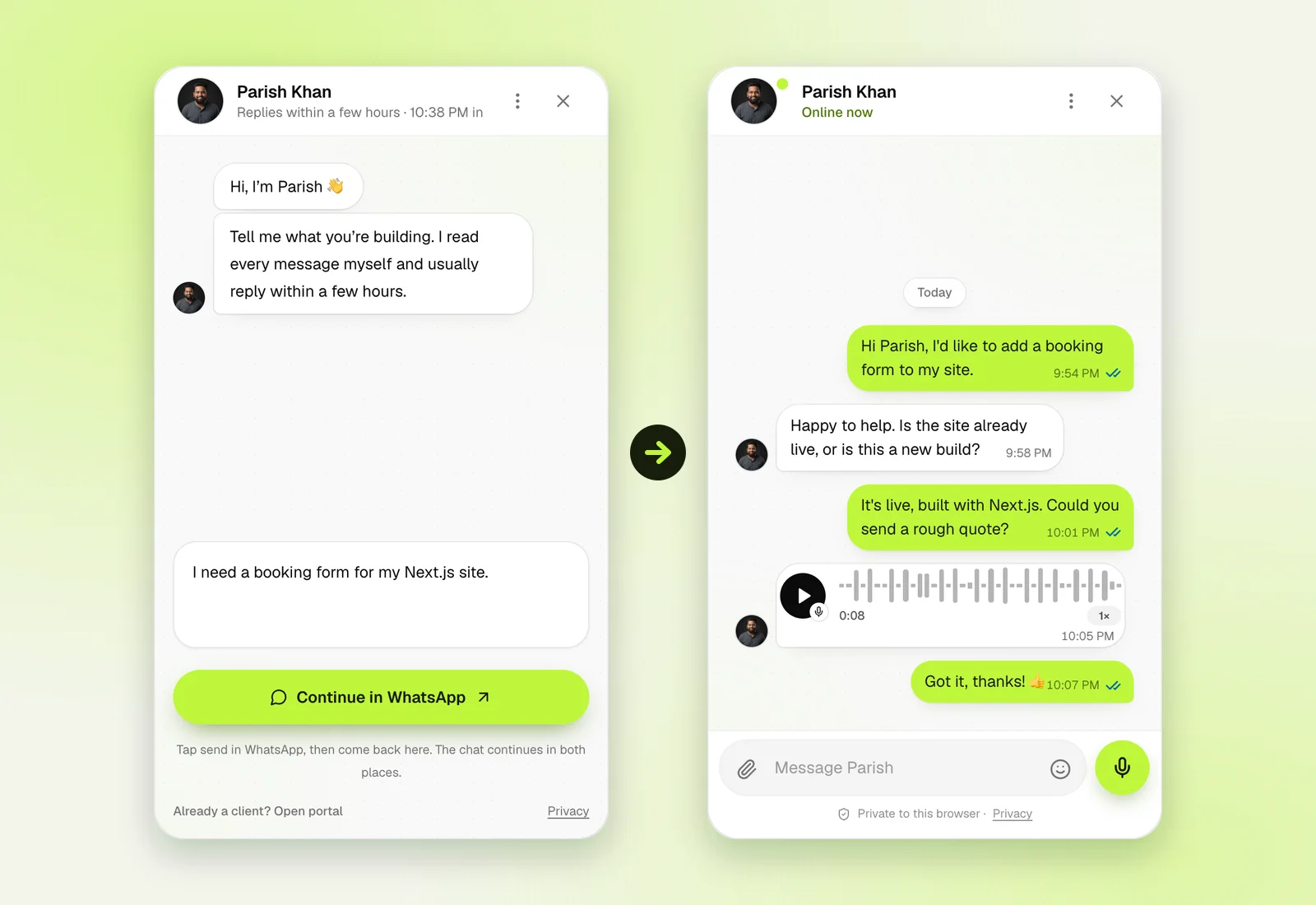
Left: what a new visitor sees. Right: the same widget after the visitor connects WhatsApp. Sample messages, rendered by the real component on my machine.
Do you need the API at all?
Before you build anything, check whether a simple link does the job. WhatsApp's click to chat feature opens a chat with your number, with an optional message already typed in:
// Full international number, digits only: no plus sign, spaces or dashes.
const number = '15551234567';
const text = 'Hi, I have a question about your services.';
const link = `https://wa.me/${number}?text=${encodeURIComponent(text)}`;
Put that link behind a button and you have "WhatsApp chat on your website". It's free, takes five minutes, and you keep answering from the normal WhatsApp app. The catch is that the conversation leaves your site. You can't show it on the page, store it, or share it with a team.
Here's how I'd choose:
- A wa.me link if you only want people to reach you on WhatsApp.
- A hosted provider (a Business Solution Provider, often called a BSP) if you want a shared team inbox, chatbots or campaigns without writing code. You pay them on top of Meta's fees.
- Your own Cloud API build if the chat has to live inside your product. For me, that meant one thread across the website, the client portal and WhatsApp.
I build web apps for a living, and I wanted the chat inside my own Next.js site and portal, so I took the third route. Be honest with yourself about the cost. My messaging code is about 6,000 lines before tests, and that's for one person answering.
What you need from Meta
Meta's Cloud API get-started guide walks you through the dashboard. Here's what you end up with, and what each piece is for:
- A Meta business portfolio. The company that owns everything else.
- A Meta app with the WhatsApp use case. Your app secret lives here. You need it to check webhook signatures.
- A WhatsApp Business Account (WABA). It holds your phone numbers and message templates.
- A business phone number. Meta creates a test number for you during setup, which is enough to try things. For real use, you add your own number, set a display name, and set a two-step verification PIN, which Meta requires at registration.
- A system user access token. The temporary token in the dashboard expires within hours. A system user token is long-lived and meant for servers. I created mine with no scheduled expiry, but Meta can still revoke it, so plan for replacing it.
- An HTTPS webhook URL. Meta sends every incoming message and every delivery status here.
- A server that keeps secrets. The token and app secret must never reach the browser. Mine run as secrets on a Cloudflare Worker. A static site can't do this part alone.
The number rule matters more than it looks. Meta's phone number docs say plainly: "Numbers already in use with WhatsApp cannot be registered unless they are deleted first." I'll come back to what that means day to day.
How my setup works
parish.cv runs on Next.js on Cloudflare Workers. The chat uses three Cloudflare pieces: the Worker handles the API routes and the webhook, R2 (Cloudflare's file storage) stores conversations and media, and a Durable Object called ChatLive keeps WebSocket connections open for live updates.
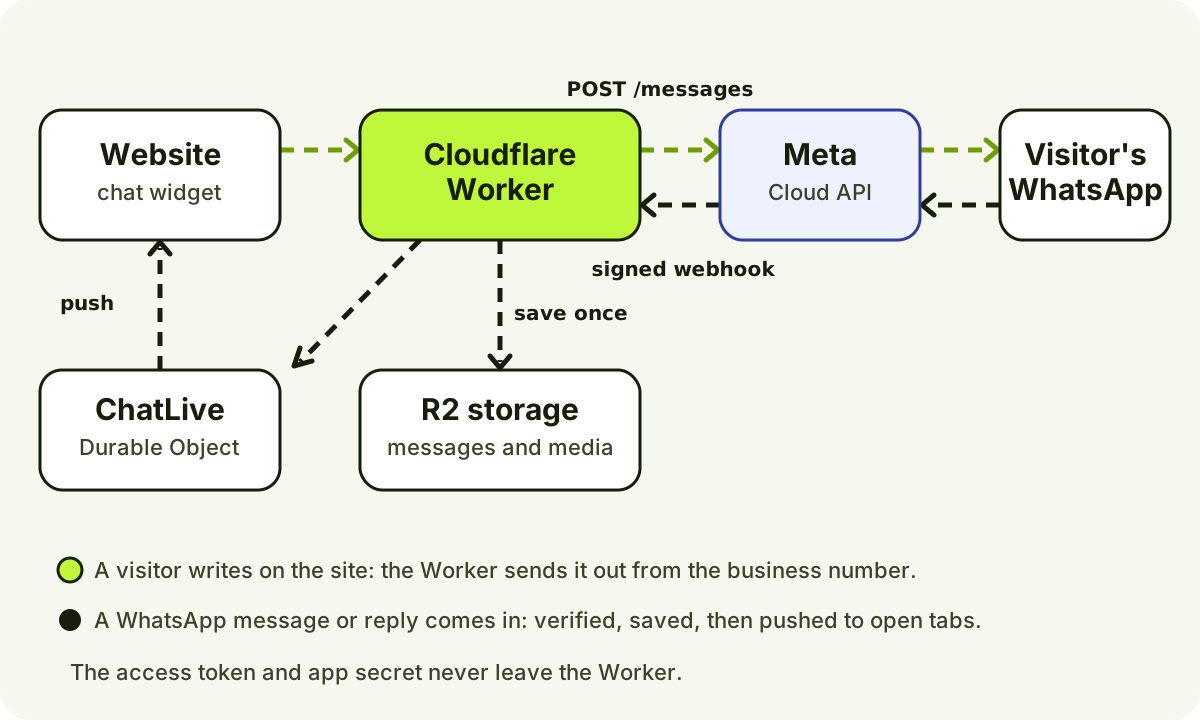
The two directions of a message. Outgoing goes through the Graph API; incoming arrives on the webhook and is pushed to open browsers.
There are three places to chat:
- The website widget, for visitors.
- The client portal, for signed-in clients. Portal messages don't need WhatsApp at all.
- My studio inbox, where I reply. A reply goes to the client's WhatsApp, their portal, and any linked browser.
Linking a browser to a WhatsApp number
The hard question is: how does the website know which WhatsApp number belongs to this visitor? I didn't want to ask for a phone number and trust it, because then anyone could type someone else's number and read their chat.
So the widget creates a one-time code and puts it in a click-to-chat link. The visitor taps Continue in WhatsApp and sends the prefilled message, which ends with something like [PCV:3f9a…]. When that message hits my webhook, it comes from the visitor's real WhatsApp number, so the code proves who they are. The server links the code's browser session to that number.
The browser holds only a random ID in a secure, HttpOnly cookie. The code expires after one hour, and the cookie after 30 days. A phone number on its own never grants access to a conversation.
The API can only speak as the business
The Cloud API sends messages from your business number. It can't send a message as the visitor. So when a visitor types on my website, their own WhatsApp thread would never show what they said.
My fix: the server sends the visitor a copy from the business, starting with "You wrote on parish.cv:". Their WhatsApp thread stays complete, and the label makes it clear the copy came from the site. My webhook skips these copies when they echo back.
Making it feel live
Meta talks to my server, not to the browser, so I needed my own way to push messages to the page. I'd already used Durable Objects for signaling in my peer-to-peer file transfer tool, so I reached for them again.
The browser asks the API for a ticket, a short HMAC-signed pass that's valid for five minutes and only for its own conversation. Then it opens a WebSocket to the ChatLive object. When a message is saved, the Worker tells the object, and the object sends it to the right sockets. The object uses Cloudflare's WebSocket Hibernation API, so it can leave memory between messages without dropping connections.
The same sockets carry signals that are never stored: "typing…" in both directions, and whether I have the studio open. Visitors see Online now while I do, and my local time in Bangladesh when I don't. If the socket fails, the page polls every three seconds, and it refreshes every 30 seconds anyway to catch anything missed.
The webhook: verify, then save once
Meta first checks your endpoint with a GET request. You echo back hub.challenge if hub.verify_token matches a string you chose. After that, every message arrives as a POST with an HMAC SHA-256 signature of the body, made with your app secret, as Meta's webhook guide describes.
This is a trimmed version of my route handler. It uses Web Crypto, so it runs on Workers, Node and Deno without a package:
export async function GET(req: Request) {
    const url = new URL(req.url);
    const ok = url.searchParams.get('hub.mode') === 'subscribe' && url.searchParams.get('hub.verify_token') === process.env.WHATSAPP_VERIFY_TOKEN;
    return ok ? new Response(url.searchParams.get('hub.challenge')) : new Response('Forbidden', { status: 403 });
}

async function validSignature(raw: string, header: string | null, secret: string) {
    if (!/^sha256=[0-9a-f]{64}$/.test(header || '')) return false;
    const key = await crypto.subtle.importKey('raw', new TextEncoder().encode(secret), { name: 'HMAC', hash: 'SHA-256' }, false, ['verify']);
    const signature = Uint8Array.from(header!.slice(7).match(/../g)!, (pair) => parseInt(pair, 16));
    return crypto.subtle.verify('HMAC', key, signature, new TextEncoder().encode(raw));
}

export async function POST(req: Request) {
    const raw = await req.text(); // Check the exact bytes Meta signed, before parsing.
    if (!(await validSignature(raw, req.headers.get('x-hub-signature-256'), process.env.WHATSAPP_APP_SECRET!)))
        return new Response('Bad signature', { status: 401 });
    try {
        await saveEvents(JSON.parse(raw)); // Your storage, keyed by WhatsApp message ID.
    } catch {
        return new Response('Retry later', { status: 503 }); // Meta tries again.
    }
    return Response.json({ ok: true });
}
Three details made my handler reliable:
- Save each message under its WhatsApp ID. Meta retries failed deliveries for up to 7 days, and its docs warn that retries "can result in duplicate webhook notifications." If the ID is already stored, I skip it.
- Return an error when storage fails. Then Meta retries, and the message isn't lost. Email alerts and push notifications run after the save, so a failed email never blocks a message.
- Check whose message it is. My handler ignores any payload that isn't for my WABA and my phone number ID. One WABA can have several apps subscribed, and I only want my own traffic.
I wrote about the same "verify the raw body first" rule for payment webhooks in my post on Supabase Slack notifications. It applies to every webhook that carries a signature.
Sending replies, read receipts and typing
Everything goes to one endpoint, under your phone number ID:
POST https://graph.facebook.com/<version>/<PHONE_NUMBER_ID>/messages
My code uses v25.0. A text reply looks like this:
async function whatsapp(body: object) {
    const res = await fetch(`https://graph.facebook.com/v25.0/${process.env.WHATSAPP_PHONE_NUMBER_ID}/messages`, {
        method: 'POST',
        headers: { Authorization: `Bearer ${process.env.WHATSAPP_ACCESS_TOKEN}`, 'Content-Type': 'application/json' },
        body: JSON.stringify({ messaging_product: 'whatsapp', ...body }),
    });
    const data = await res.json();
    if (!res.ok) throw new Error(`WhatsApp error ${data.error?.code}`);
    return data;
}

// A reply. Add context.message_id to show it as a quoted reply in WhatsApp.
await whatsapp({ recipient_type: 'individual', to: '15551234567', type: 'text', text: { body: 'Thanks! I will send a quote today.' }, context: { message_id: incomingId } });

// Mark their message read (blue ticks) and show "typing..." on their phone.
await whatsapp({ status: 'read', message_id: incomingId, typing_indicator: { type: 'text' } });
That last call does two jobs. When I open a thread in my studio, the server marks the latest WhatsApp message as read, so the client sees blue ticks. While I type, the same call with typing_indicator shows "typing…" in their WhatsApp. Meta dismisses the indicator when you reply or after 25 seconds, so I send it at most once every 15 seconds. Read receipts work for 30 days after a message arrives.
Attachments take two calls: upload the file to /<PHONE_NUMBER_ID>/media, then send a message with the returned media ID. Watch the formats. WhatsApp images must be JPEG or PNG under 5 MB, audio and video are capped at 16 MB, and WebP only works as a sticker.
When a message has several parts, like text plus two files, my server records each part after it's sent. If the third part fails and the client retries, the first two aren't sent again.
The 24-hour customer service window
This rule shapes everything. When a customer messages you, a 24-hour customer service window opens. Inside it, you can send any normal message. Once 24 hours pass since their last message, you can only send pre-approved template messages. Try anything else and the API returns error 131047: "More than 24 hours have passed since the recipient last replied to the sender number."
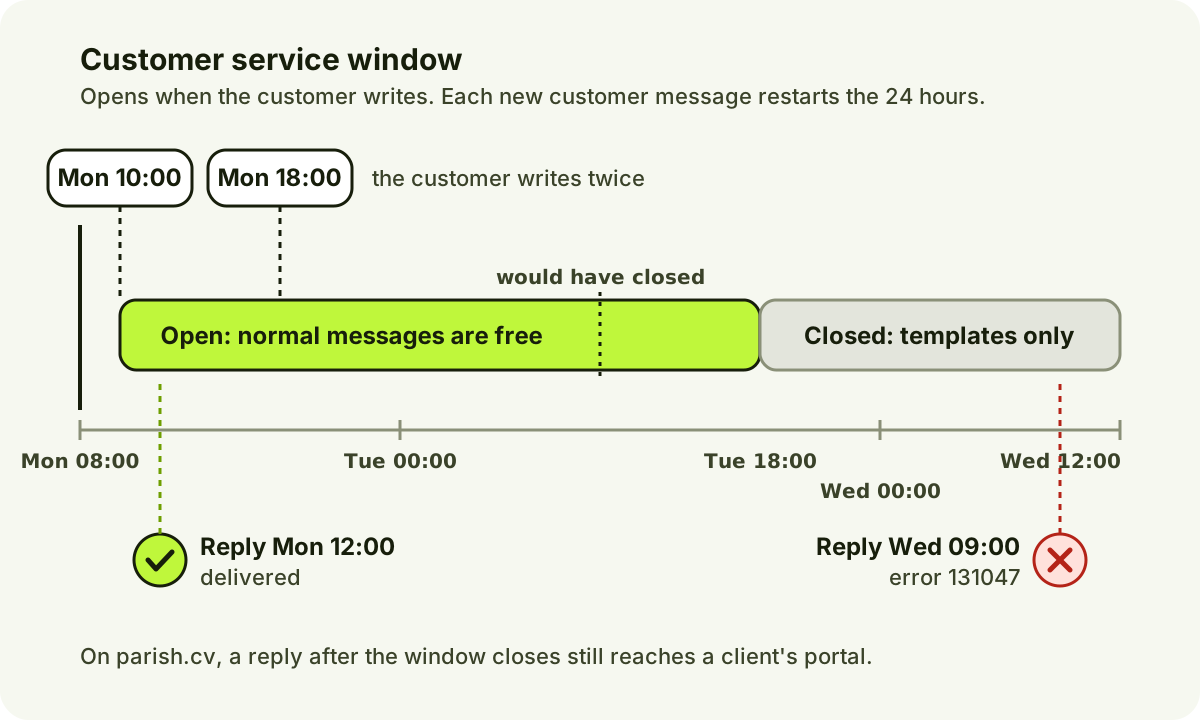
Every new message from the customer resets the clock. Your own messages don't.
For a website chat this has a real effect. Say a visitor writes on Monday and I answer on Wednesday. WhatsApp won't take a normal message anymore. I haven't set up any paid templates, so the site works around it:
- Clients in the portal still get my reply there, with a push notification. WhatsApp copies start again when they next message me on WhatsApp.
- Website visitors see a notice asking them to send a new WhatsApp message. That reopens the window, and the chat continues.
- WhatsApp-only contacts have to write first. My inbox tells me so before I waste time typing.
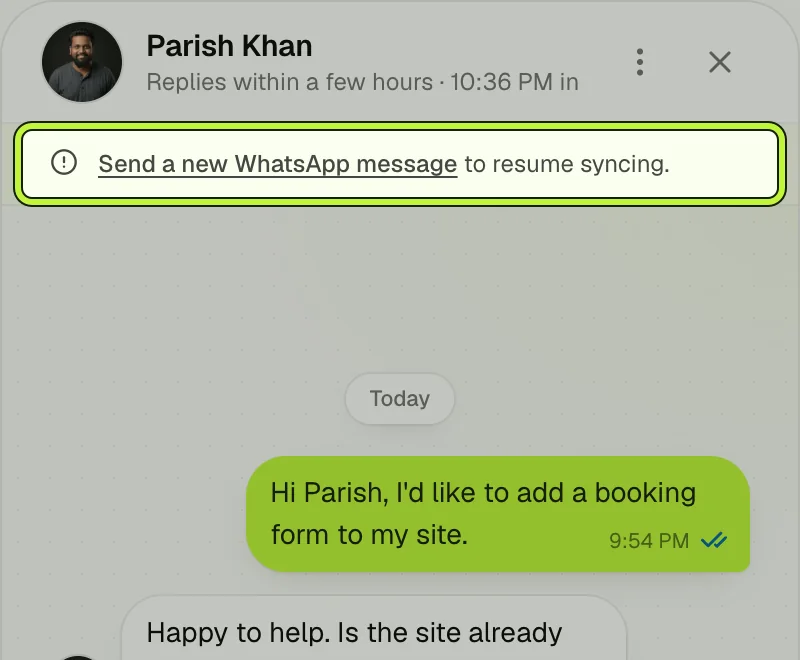
The widget once the window closes. The link in the notice opens WhatsApp, and one message from the visitor reopens it.
What the WhatsApp Cloud API costs
Meta moved to per-message pricing on July 1, 2025. According to Meta's pricing page, checked in October 2026:
- Normal (non-template) messages are free, but you can only send them inside an open customer service window.
- Template messages are charged when delivered. There are three categories (marketing, utility and authentication), and the rate depends on the category and the recipient's country code.
- Utility templates sent inside an open window are free.
My chat sends no templates at all, so under these rules it creates no per-message charges from Meta. Hosting is a separate cost, and so is a BSP if you use one. Meta's API itself has no monthly fee.
There's also a cap on reaching new people. A new business portfolio can message 250 unique people in a rolling 24 hours outside of customer service windows, and that rises as you verify the business and keep quality high. In my chat, customers always write first, so this cap doesn't come into play.
Voice notes and the bug that broke them
I wanted website visitors to send voice notes that arrive in WhatsApp as proper voice messages, with the microphone icon and play button. Meta's audio message docs are clear: voice messages need an .ogg file with the Opus codec, sent with "voice": true.
Chrome's MediaRecorder records Opus too, but it wraps it in a WebM file. WhatsApp won't accept WebM. Re-encoding audio on a Worker would be slow and heavy, so I wrote a small repackager in TypeScript. It reads the Opus packets out of the WebM file and writes them into Ogg pages, without touching the audio itself.
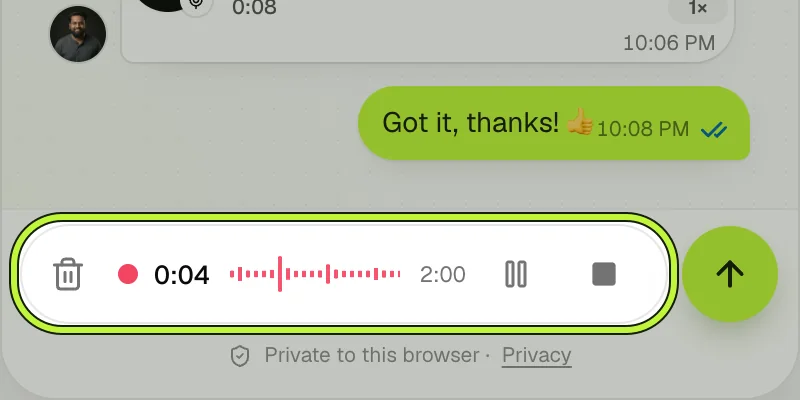
Recording in the widget. The visitor can pause, then listen back before sending. Recordings stop at two minutes.
My first version passed its test with a short clip. Then the real bug showed up: any Chrome voice note longer than about two seconds failed with "Invalid voice recording."
Here's what was going on. A WebM file is a tree of elements, and normally each element says how big it is. My recorder calls MediaRecorder.start(250), which asks Chrome for a chunk of audio about every 250 milliseconds. Chrome starts a new Cluster (a block of audio) for each chunk and marks it as "unknown size", because it's still recording. My first parser was recursive and read "unknown size" as "lasts until the parent ends". So every new Cluster landed inside the previous one. The parser refused to go deeper than 8 levels, and in my test recording it gave up on the 8th Cluster, which starts 2.1 seconds in.
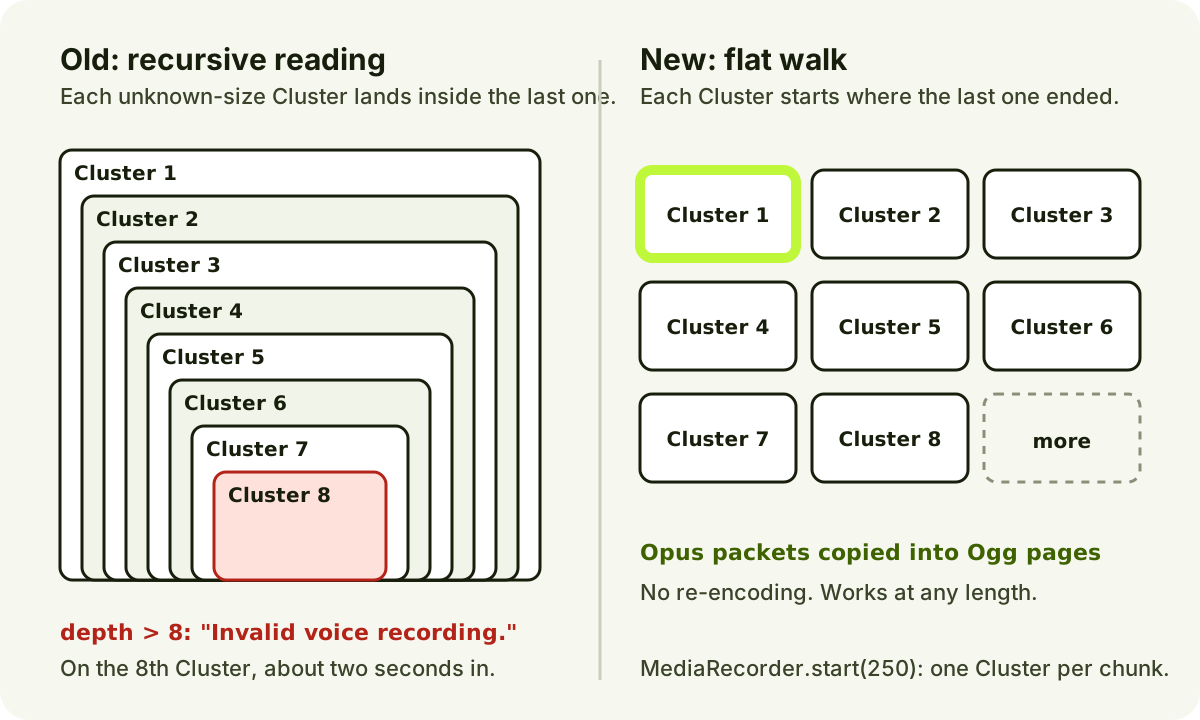
Same file, two readings. Chrome's Clusters are siblings, not a staircase.
The fix was to stop recursing. The parser now walks the file flat: it steps into the few container elements it cares about and skips everything else by size. Only the Segment and Cluster elements may have an unknown size. Here's the core of it, simplified from my code:
// Segment, Tracks, TrackEntry, Cluster, BlockGroup: step inside these.
const containers = new Set([0x18538067, 0x1654ae6b, 0xae, 0x1f43b675, 0xa0]);
// Only Segment and Cluster may say "unknown size" in a live recording.
const streamed = new Set([0x18538067, 0x1f43b675]);

while (offset < bytes.length) {
    const id = readId(offset);
    offset += id.width;
    const size = readSize(offset);
    offset += size.width;
    if (containers.has(id.value)) {
        if (size.unknown && !streamed.has(id.value)) throw new Error('Invalid voice recording.');
        continue; // Step inside. A new Cluster simply starts after the old one.
    }
    if (size.unknown) throw new Error('Invalid voice recording.');
    handleElement(id.value, bytes.subarray(offset, offset + size.value)); // Opus packets, codec name, header.
    offset += size.value;
}
To prove it, I kept an 8-second recording made by Chrome as a test fixture. Running the old parser against it today still fails with "Invalid voice recording."; the new one turns the 126 KB WebM file into a 129 KB Ogg file that ffmpeg reads as 8.46 seconds of 48 kHz mono Opus. The fix was also checked against Chrome recordings of 1, 3, 8, 20 and 45 seconds, all decoded with ffmpeg.
One more limit from Meta's docs: WhatsApp only shows the play icon for voice files of 512 KB or less. Bigger ones show a download icon. My 8-second test file works out to about 15 KB per second, so voice notes longer than about half a minute will likely cross that line. That's an estimate from one recording, not a measured cutoff.
Your number leaves the WhatsApp app
This is the limitation I'd want to know first. My business number is registered on the Cloud API, and Meta's phone status for it reports platform_type: CLOUD_API. That means I can't sign in to that number in the WhatsApp or WhatsApp Business app on my phone. The API is the only way in.
Meta does have an official way to use both, called Coexistence. It lets a number keep working in the WhatsApp Business app while the API runs alongside. But Meta's guide to onboarding WhatsApp Business app users sets some conditions:
- The onboarding has to go through a Solution Partner or Tech Provider using Embedded Signup.
- The number has to start in the WhatsApp Business app (version 2.24.17 or newer).
- Some app features switch off, including disappearing messages, view-once messages, live location and new broadcast lists. Linked devices are unlinked when you onboard.
- Throughput is fixed at 20 messages per second.
My number was registered directly on the Cloud API, so it doesn't qualify. 360dialog's guide puts it simply: "If the number is connected to the WhatsApp API, this Coexistence Onboarding won't work." To switch, I'd have to delete the number from my WABA, set it up in the Business app, and onboard again through a partner, with new credentials for my site and some downtime. I haven't done that. My webhook already accepts the echo events Coexistence sends (smb_message_echoes), in case I do it later.
So I built two workarounds instead.
A phone relay: answer clients from my own WhatsApp
When a client writes and I'm away from the studio, the server forwards the message to my personal WhatsApp, with the client's name in bold on top. Photos, files and voice notes come through too. If I swipe-reply to a forwarded message, the server reads the reply's context ID, works out which client it belongs to, and sends my answer from the business number. A ✅ reaction tells me it was delivered. Reacting to a forwarded message reacts for the client.
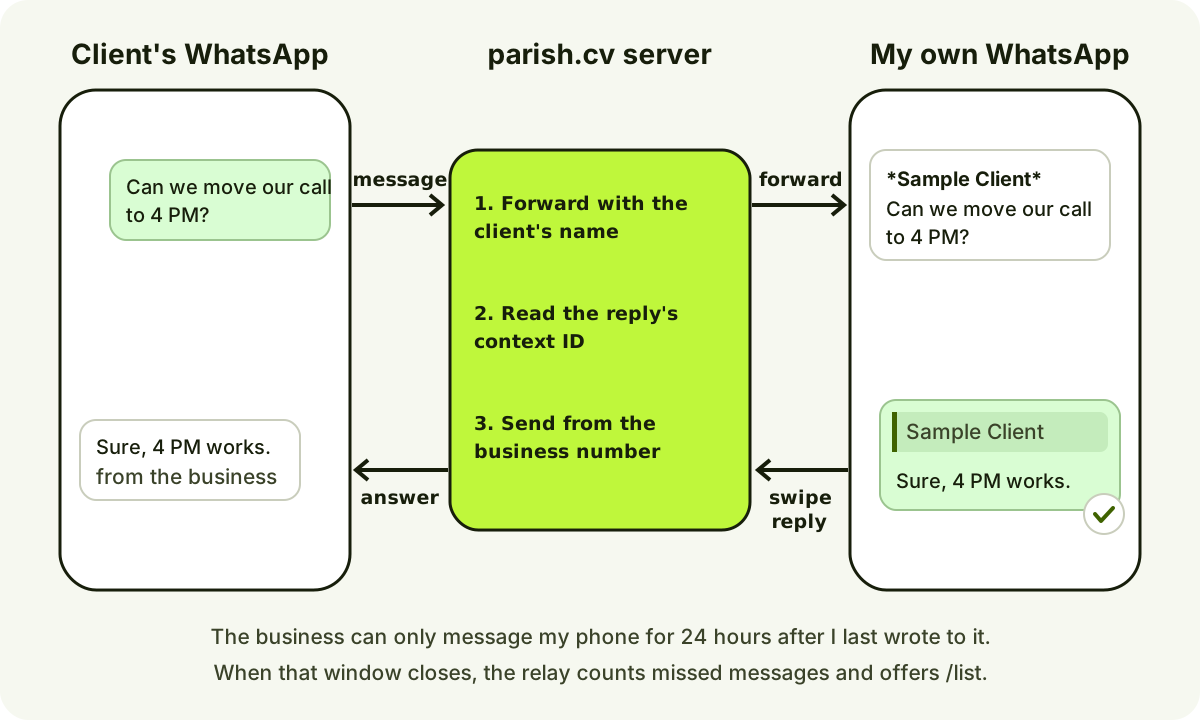
The relay treats my own phone as just another WhatsApp user, with a few extra powers.
There are a few commands too. /list shows recent conversations, /2 message replies to the second one, and /away or /always choose whether forwards happen only while my studio is closed. To connect my phone, I send a one-time RELAY code from it to the business number, so nobody else can sign up as me.
The relay has the same weakness as everything else here: the 24-hour window. My phone is a WhatsApp user like any other, so the business can only message it for 24 hours after I last wrote to it. Every message I send keeps the window open. When it closes, the relay can't forward anything. It counts what it missed and, the next time I write, tells me how many and offers /list to catch up.
Push notifications without a library
For the hours when the relay is asleep, the studio and portal can be installed as web apps with real push notifications. I wrote the Web Push code on Web Crypto: payload encryption from RFC 8291 and VAPID signing from RFC 8292. My test reproduces the RFC 8291 example byte for byte. Android Chrome works straight from the browser. On iPhone, you have to use Share, then Add to Home Screen, and turn notifications on inside the installed app.
If I'm not in the studio at all, I also get an email for new website messages through Resend, the same service I use for email on my custom domain.
What's tested and what isn't yet
I'd rather be clear about this than make it sound finished:
- Tested live on October 15, 2026: messages from my personal WhatsApp linked a browser and showed up in the widget and my inbox. Replies from the inbox and from the linked website reached WhatsApp, and Meta reported them as read.
- Tested live on October 16, 2026: the WebSocket connection, messages in both directions, and WhatsApp read receipts in Chrome. Unauthenticated socket requests were rejected.
- Also checked live: unsigned webhook requests are rejected with a 401.
- Covered by automated tests: webhook signatures, duplicate retries, the relay (forwarding, swipe replies, reactions, sleep), the voice repackager with a real Chrome recording, and the Web Push test vector.
- Not yet done: a full end-to-end run with a second WhatsApp number, covering relay forwards and replies, push notifications on a phone, and a website voice note arriving in WhatsApp. The new version went live on October 16, 2026, and that test is next.
There's also a design limit. I store each conversation as small JSON files in R2. That's fine for one person answering a handful of chats. A support team with many agents and heavy traffic should use a real database and queue for ordering and quotas.
Troubleshooting
My webhook verifies, but no messages arrive
Verification only proves your URL works. Your app also has to be subscribed to your WABA's webhooks, with POST /<WABA_ID>/subscribed_apps, and to the messages field in the app dashboard. When I tested my own setup, checking and refreshing that subscription was part of the process.
Sends fail with error 131047
The 24-hour window is closed. The customer has to message you first, or you need an approved template. See the window section.
Every webhook request returns 401
You're probably checking the signature against parsed and re-serialized JSON. Hash the raw body exactly as it arrived, with the app secret of the app that's subscribed (not the token).
A voice note arrives as a file, not a voice message
Check three things: the file is Ogg with the Opus codec (not WebM), it's mono, and you sent "voice": true in the audio object. Files over 512 KB show a download icon even when everything else is right.
An image upload is rejected
WhatsApp images must be JPEG or PNG. Images saved from websites are often WebP, and iPhone photos can be HEIC. Convert them first, or send them as documents.
When I'd build this again
For my own site, building it made sense. I wanted one thread across the website, the portal and WhatsApp, and owning the code means no vendor sits between my clients and me.
But I wouldn't recommend it to most small businesses. If you just want people to message you, use a wa.me link and keep the WhatsApp Business app. If you need a team inbox, a BSP will be cheaper than the time it takes to build one. And if you're going to build on the API anyway, decide about Coexistence before you register your number. That's the one choice I can't undo easily.
If you want something like this inside your own product, the backend side is the kind of API development and Cloudflare Workers work I do for clients.
FAQ
Is the WhatsApp Cloud API free?
The API has no monthly fee, and normal messages inside a 24-hour customer service window are free. You pay per delivered template message, with rates set by category and the recipient's country. Hosting and any BSP fees are separate.
Can I use the WhatsApp Business app and the API on the same number?
Only through Meta's Coexistence onboarding, which goes through a Solution Partner or Tech Provider and starts from a number already in the WhatsApp Business app. A number registered directly on the Cloud API, like mine, can't be used in the app.
Do I need a BSP to use the WhatsApp Business API?
No. Meta hosts the Cloud API, and you can connect to it directly with your own app, as I did. A BSP is worth it if you want a ready-made inbox, chatbot tools or help with onboarding.
How do I add WhatsApp chat to my website without the API?
Use a click-to-chat link: https://wa.me/ followed by your full international number in digits, plus an optional ?text= message. Put it behind a button. Visitors chat in their own WhatsApp app, and you reply from yours.
Can my website send WhatsApp messages to anyone?
No. You can only send free-form messages to people who messaged you in the last 24 hours. To start a conversation, you need an approved template, and new business portfolios can reach 250 unique people per rolling 24 hours that way. Only message people who agreed to hear from you.
How this post was prepared: I wrote it with help from an AI assistant, which also helped me build parts of the chat system it describes. Every limit, price and API detail was checked against my code or Meta's documentation on October 16, 2026. The screenshots show my real chat component running locally with sample messages, not real client conversations.