VPS migration without downtime: Contabo to OVH
A VPS migration without downtime for readers: my Contabo to OVH move with Coolify, verified SQLite backups, a publishing freeze, and rollback.
My homepage was loading quickly while normal search requests were timing out. That was the confusing part of the Contabo problem: Cloudflare could serve a cached page even when the application behind it was struggling. On November 5, 2026, I moved TutorialSearch from Contabo to an OVH VPS using Coolify.
This is my VPS migration without downtime for public browsing. I prepared and tested the new server before changing the production origin, while the old server continued serving the site. I temporarily paused blog publishing for the final data copy. The checks below passed before and after the switch; they are not continuous uptime measurements for every visitor.
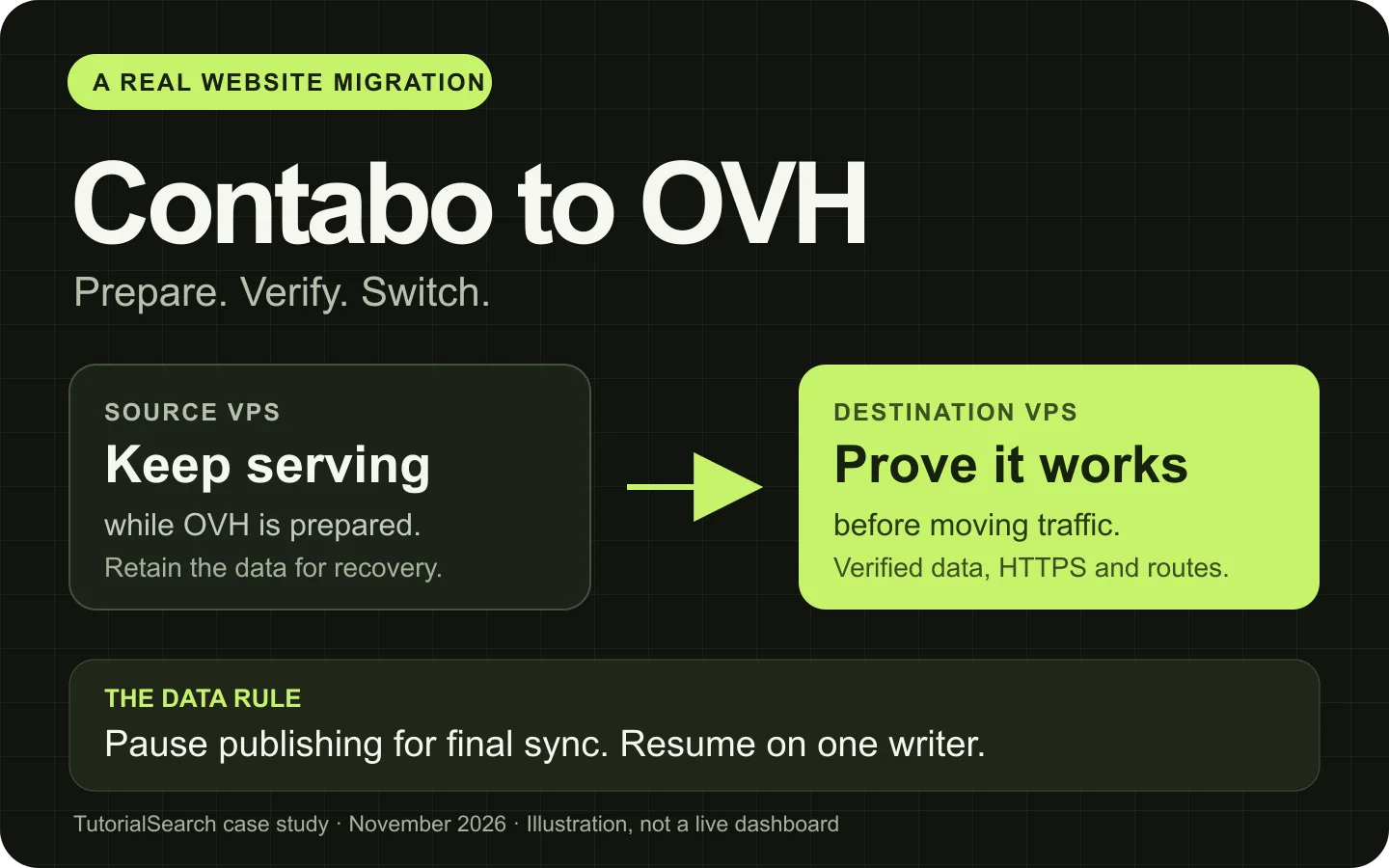
The important order: prepare the destination, verify it, then move traffic. Public reading and publishing have different requirements.
On this page
- The migration in eight steps
- The problem I had with Contabo
- What I was moving
- Prepare OVH and a protected preview
- Copy and verify the final data
- Test HTTPS and the application before DNS
- Switch traffic and prove the new origin
- Preserve SEO, assets, and rollback
- Load testing and monitoring
- What I would do again
- Questions about VPS migration
VPS migration without downtime: the short version
For a site like mine, the process was:
- Investigate the old server. Separate cache performance, application failures, CPU pressure, and memory limits before deciding what needs to change.
- Prepare the new VPS independently. Set up Coolify, private operator access, persistent storage, and the same application release.
- Deploy a protected preview. Test pages, search, images, authentication, backups, and restart recovery while production stays on the old server.
- Pause the relevant writers. Freeze content publishing and inventory background jobs so the final copy cannot miss new content.
- Make a consistent snapshot and verify it. Copy database backups and files, then compare checksums, integrity results, and row counts.
- Activate the verified data through Coolify. Keep the previous destination data, restart the intended resources, and test the real production hostnames directly.
- Change only the production origin records. Preserve TLS, proxy settings, and unrelated DNS. Confirm uncached public requests reach the new server.
- Give the new server sole write ownership. Stop the old production app after successful checks, resume publishing, and retain the old data for rollback.
For a store that must accept orders throughout the move, the data plan needs more work. Use an appropriate shared database or a tested replication and final-switch process. A temporary publishing freeze worked for my site; it is a real interruption to writing, even though readers could continue browsing.
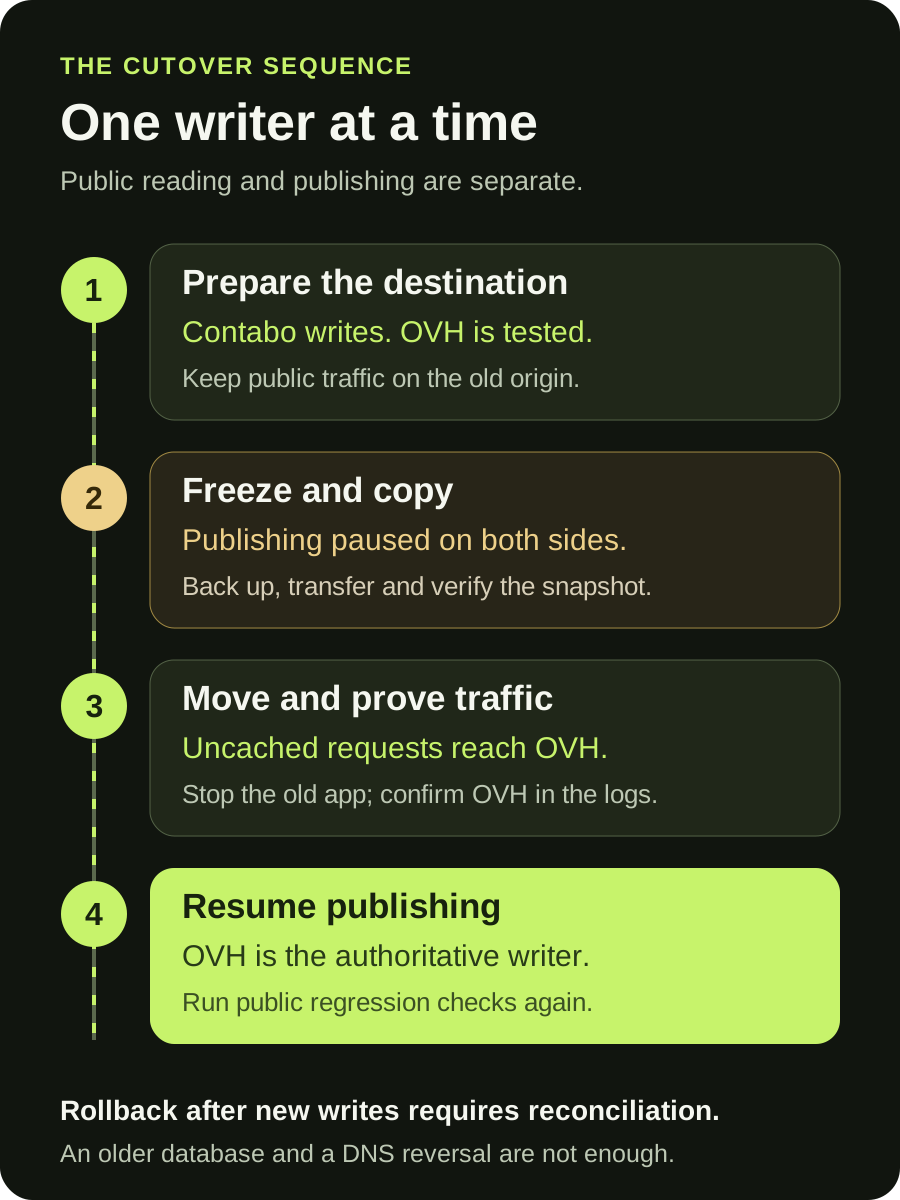
One authoritative writer at a time. The animation highlights the sequence; all steps remain readable without motion.
The problem I had with Contabo
The reason I left was recurring origin slowness and timeouts. By origin, I mean the server running the application behind Cloudflare.
Here are observations from the November 4 investigation. These were small, sequential diagnostic probes, not a stress test.
| Probe | What the recorded checks showed |
|---|---|
| Public homepage served from Cloudflare cache | About 0.24 to 0.55 seconds to the first byte |
| Public health endpoint | Five successful responses took about 6.39 to 11.81 seconds; another request timed out at 15 seconds |
| Health endpoint called directly on the application network | Four recorded requests timed out at about 12 seconds |
| Ordinary search through the local gateway | Two recorded requests timed out at about 12 seconds |
The local failures mattered. Those requests did not need a visitor's connection or Cloudflare to reach the application, so changing the CDN alone would not explain or repair them.
The four-vCPU host also showed high CPU scheduling pressure. Linux's CPU pressure reading, some avg10, reached 87.47% in the sampled period. This measures time when at least some work is waiting for CPU; it does not mean 87.47% CPU utilization or prove a specific amount of missing capacity. The Linux PSI documentation explains that distinction.
Memory did not point to the same problem. The host had about 4.6 GiB available RAM, and the inspected application counters showed no out-of-memory kills. Another reviewed 30-minute window contained 83 nginx upstream response-header timeouts across normal site features.
There was also unusual virtual CPU accounting that warranted investigation with the provider. I did not obtain the provider-side evidence needed to establish oversubscription, physical-host contention, or account-level throttling as the root cause. Application work and the other services on the VPS also consumed CPU.
That is the limit of my claim about Contabo. My instance had measurable stalls, and the underlying scheduling issue was unresolved. This is a case study of my server, not evidence that every Contabo VPS behaves this way.
A narrowly scoped crawler block helped recover an earlier 503 incident, but origin latency was still inconsistent afterward. I chose to move the application while keeping the old server and data available for recovery.
What I was moving from Contabo to OVH
TutorialSearch runs a Next.js application behind an nginx gateway and Coolify's proxy. Cloudflare handles the public edge. The migration included persistent SQLite databases, images, and static assets.
The final source snapshot contained:
- Five SQLite databases.
- 1,039 source files, about 8.08 GB before the additional compatibility assets.
- 309,344 tutorial records and 500 blog posts.
- Images, cache data, and previously published static files.
The external Supabase authentication project stayed in place. Moving the web server did not require copying user accounts into a new identity system.
I kept the same application release on both servers. Changing the provider, application behavior, and database schema in one operation would have made failures harder to diagnose.
Coolify managed application configuration and lifecycle on both sides. SSH was used for inspection and data migration, rather than starting a second unmanaged application stack beside Coolify.
Prepare the new VPS and a protected preview
Keep the two servers separate
I used an independent Coolify instance on OVH and separate operator credentials, SSH identities, host-key records, environment files, and resource identifiers for each provider. I also used explicit server names in the access helpers.
This sounds administrative until a restart command reaches the wrong production server. Label the source and destination before doing anything with data or DNS.
In Coolify, recreate the application's actual dependencies: Git access, environment variables, persistent mounts, health checks, domains, and resource limits. Keep integration secrets compatible where clients depend on them, while giving the infrastructure its own credentials.
Use a preview that is safe to test
I deployed OVH under a temporary hostname protected by Cloudflare Access, with indexing disabled. Production continued using Contabo during preparation.
The preview let me test browsing, a real search request, course pages, blog posts, and copied images. I checked that the production release was the one being built, rather than assuming the preview branch was current.
Authentication needed its own test. The preview exposed a redirect allowlist issue: a bare callback was accepted, while the callback with its return-path query was not. I added the intended preview callback patterns and preserved the production Site URL. A complete Google sign-in then reached the authenticated preview library.
My full Google sign-in check happened before cutover on the preview. After the DNS switch, the regression suite checked login availability, protected routes, and callback origin; I did not repeat a complete Google login and logout cycle.
Prove backups and persistence before the move
I configured a Coolify-managed daily backup job and tested restoring an archive into a separate temporary directory. The restore check covered file checksums, SQLite integrity, and row counts.
A preparation-stage OVH reboot also confirmed that Tailscale, services, and persistent data returned. I did this before moving production, so a restart problem would not become a public incident.
I use Tailscale for private operator access. If you need that part of the setup, I have a separate SSH and Tailscale walkthrough.
Copy consistent data before the final switch
An early preview copy is useful for testing. It is not automatically the final production dataset.
Inventory writers, then freeze the right operations
I checked application writers, publishing endpoints, scheduled jobs, and host cron jobs. For the final synchronization, a temporary edge rule blocked mutating blog API operations. Browsing and ordinary search remained available.
The databases also contained disposable caches. Those are different from authoritative posts and uploads: a cache can be rebuilt, while a lost published article cannot. Cross-database consistency needs special attention if your application performs related writes across several database files.
Back up SQLite through SQLite
I used SQLite's backup API with explicit read transactions on the source connections. I did not copy changing database and WAL files as unrelated loose files. SQLite documents the online backup API for making database copies while a source may be in use.
This is a small example for one database. Replace the paths and create a new destination for each snapshot. The final migration also needs the related uploads and other databases.
from contextlib import closing
from pathlib import Path
import os
import sqlite3

source_path = Path("/srv/site/data/content.sqlite")
snapshot_path = Path("/srv/migration/content.sqlite")

os.umask(0o077)
snapshot_path.parent.mkdir(mode=0o700, parents=True, exist_ok=True)
if snapshot_path.exists():
    raise FileExistsError("Keep the previous snapshot; use a new path")

source_uri = source_path.resolve().as_uri() + "?mode=ro"
with closing(sqlite3.connect(source_uri, uri=True)) as source:
    source.execute("BEGIN")
    source.execute("SELECT name FROM sqlite_master LIMIT 1").fetchone()
    with closing(sqlite3.connect(snapshot_path)) as snapshot:
        source.backup(snapshot)
        result = snapshot.execute("PRAGMA integrity_check").fetchone()[0]
        if result != "ok":
            raise RuntimeError(result)

print("Snapshot integrity: ok")
This protects the consistency of that database's copy. It does not turn five independent databases and an uploads directory into one atomic transaction. The writer inventory and publishing freeze are part of the data-safety plan.
Check the transfer, not just the exit code
I generated a manifest with file sizes and SHA-256 hashes, transferred the snapshot, and verified every file on OVH. All five databases also passed integrity checks and expected row counts.
These checks answer different questions. A matching checksum says the copied bytes match the snapshot. SQLite integrity says the database structure is sound. Counts help catch a valid but incomplete or outdated dataset. None replaces confirming that the application reads the expected records and images.
I then stopped only the relevant OVH resources through Coolify, retained the previous preview data directory, and renamed the verified incoming directory into the production data path. Restarting through Coolify made the new containers bind to the intended directory. I checked the mounts and counts again afterward.
Test production HTTPS and routes before changing DNS
A preview can work while the real hostname fails because of a certificate, proxy rule, cookie, or origin setting. I configured the production hostnames on OVH before moving public traffic.
For this Cloudflare-proxied site, I installed a separate Cloudflare Origin CA certificate through Coolify's managed proxy configuration and kept Full (strict) SSL. Cloudflare's Origin CA documentation explains the trust model: these certificates secure the origin connection and are not ordinary browser-trusted public certificates.
For a direct origin check, curl --resolve sends a real hostname to a chosen server while preserving the HTTP Host header and TLS server name. For an Origin CA certificate, provide the appropriate official CA root:
curl --resolve example.com:443:203.0.113.20 \
  --cacert /path/to/cloudflare-origin-ca-root.pem \
  'https://example.com/api/health?nocache=1'
The hostname, IP, CA path, and health endpoint above are placeholders. A publicly trusted certificate normally uses your usual trust store instead of the Origin CA file. I kept certificate verification enabled throughout the real tests.
The direct-origin regression suite passed 23 checks before DNS changed. It covered the release and health response, homepage, JavaScript and CSS, browse and course pages, blog content, images, search, login routing, API authorization, redirects, canonical URLs, robots rules, and sitemaps.
Switch traffic, then prove which origin is serving it
I changed only the production apex and image A origins from Contabo to OVH. The existing www CNAME stayed pointed at the apex. Proxy status, automatic TTL, and unrelated mail and other application records were preserved.
The production records were proxied through Cloudflare. In that arrangement, visitors continue connecting to Cloudflare while the configured origin changes. This differs from a DNS-only move, where clients may keep connecting directly to a cached old IP. Cloudflare documents its proxied-record TTL behavior; propagation still needs verification.
If you manage DNS-only records, lower their TTL ahead of the move when possible and keep the old origin serving until cached traffic has drained. Changing a TTL at the moment of cutover does not shorten copies that were already cached under the previous value. Check for an old AAAA record as well; I left production AAAA records unset because OVH IPv6 serving had not been verified.
A cached 200 is weak migration evidence
After changing the origin records, all 23 public regression checks passed. I compared the source and destination blog content, then stopped the old Contabo production app through Coolify to prevent it remaining an independent writer.
I made a fresh, uncached public health request carrying a unique user-agent marker. That request returned the expected release and appeared in OVH's gateway log while Contabo's production app was stopped. This was stronger evidence than a fast homepage response from Cloudflare's cache.
Then I removed the temporary publishing freeze and repeated the public suite. All 23 checks passed again, now with publishing enabled and the old production app stopped. Browser checks also covered search, filters, course navigation, and mobile rendering.
This is the order I want during a migration: confirm the new route, establish one active writer, resume the paused operations, and test again.
Preserve URLs, old assets, and a usable rollback
Keep the SEO-facing behavior stable
The public domain and page paths stayed the same. I preserved canonical URLs, internal links, robots behavior, sitemaps, and Search-facing content. The preview remained protected and excluded from indexing, while the production hostname remained indexable.
Google's hosting-change guidance follows the same broad sequence: prepare and test the destination, move traffic, monitor both sides, and shut down the old hosting when the move is working. If you also change public URLs, plan that as a separate URL migration.
Hosting changes do not guarantee better rankings. They should first preserve the pages and behavior search engines and readers already rely on.
Do not strand cached pages without JavaScript
A Next.js page cached before the move can reference JavaScript or CSS from the old build. If the new server cannot serve those files, a page can arrive successfully and still fail in the browser.
I retained 189 current static assets from Contabo alongside the destination's compatibility assets. Of those, 120 needed copying and 69 already matched. The checksums were verified before the merge. This addressed cached HTML referencing the older asset set.
Next.js discusses related deployment concerns in its self-hosting and version-skew guidance. Keeping the same source release helps, but I still checked the actual generated assets.
Keep data rollback separate from DNS rollback
I kept the Contabo host, stopped production resource, configuration, and original data. I also retained the previous OVH preview directory and the final source snapshot.
Before new writes, reversing an origin change is relatively simple. After OVH accepts new posts or uploads, switching DNS back to an older dataset can lose or split content. Freeze writers again, reconcile those new writes, start and verify the intended destination, and only then reverse traffic.
Later, I made Contabo private for SSH, Coolify, and development through Tailscale. That also required removing the public development tunnel route. Closing inbound ports alone would not remove an outbound tunnel's public route.
For Docker hosts, account for forwarded container traffic as well as host input. Docker explains the firewall paths for published ports. I verified both VPN access and failed public probes before removing a timed firewall rollback safeguard.
A future production rollback to that now-private server would also need an approved web ingress path before changing DNS. Keeping a VPS powered on is only part of keeping a rollback usable.
What the OVH load test actually showed
During preparation, the bounded test made 1,471 requests with zero failures. It used mixed homepage, health, browse, and course routes, with stages targeting 2, 5, 10, and 20 requests per second and at most 16 clients.
At the approximately 20-request-per-second stages:
| Server-local test mode | Actual requests/second | p95 latency | p99 latency |
|---|---|---|---|
| Gateway cache eligible | 19.77 | 14.81 ms | 67.24 ms |
| Gateway cache bypassed | 19.70 | 72.35 ms | 117.79 ms |
The p95 value means 95% of measured requests finished within that time. These tests ran locally against the server. Bypassing the gateway cache still allowed application and operating-system caches. The numbers are not Internet latency or a maximum-capacity claim, and they are not an identical-workload comparison with the earlier Contabo diagnostic probes.
After cutover, I enabled Coolify's native server metrics and traffic analytics. CPU, memory, disk, load, and network charts received samples, alongside request counts, status codes, latency, and visitor breakdowns. One Coolify 4.6 limitation remained: the Compose application's aggregate CPU and memory chart did not match Sentinel's container-name keys. Server charts and traffic analytics worked.
The daily backup job and a restore drill were in place, but recurring off-site backups were still missing. That is an improvement I need to make: a backup stored only on the same VPS cannot cover losing that VPS.
The sanitized migration evidence lists the recorded dataset, regression, and load-test figures without publishing server addresses, account identifiers, or credentials.
What I would do again
I would prepare a second origin, keep the application release fixed, test data restoration, and verify real uncached traffic before retiring the old writer. I would also check generated static assets earlier, because successful HTML delivery does not guarantee a working page.
My decision to leave Contabo came from the failures I could measure on my instance. OVH passed the acceptance and load checks for this workload. That is useful evidence for my move, rather than a universal hosting recommendation.
If your application is difficult to move because its storage, secrets, deployments, and health checks are unclear, fix that operating model as part of the work. This connects closely to my Next.js development and performance optimization work: understand the failure, make a controlled change, and verify the result.
An AI coding agent helped carry out the investigation and migration and prepare this article. The case-study numbers were checked against the saved operational reports. Command examples use placeholder addresses.
Questions about migrating a website between VPS providers
Can I move a website to another VPS without downtime?
You can prepare and test the new server while the old one continues serving, then move traffic after verification. The harder part is handling writes consistently during that transition. My migration kept browsing available and temporarily paused publishing; applications that need uninterrupted writes require an appropriate shared-data or replication plan.
Do I need to move my domain registration too?
A VPS move usually changes the server behind the domain, not the registrar that manages the registration. I kept the domain and public URLs and changed the relevant origin records. Preserve unrelated mail records and check every hostname the application uses.
Will moving from Contabo to OVH fix a slow website?
That depends on the cause of the slowness. My Contabo instance showed recurring origin stalls and CPU scheduling pressure, while the prepared OVH deployment passed its tests. Slow queries, application bugs, oversized images, or an overloaded replacement server can still make a site slow after a hosting change.
When can I shut down the old VPS?
After you have verified the new origin, confirmed data and writes, accounted for remaining traffic to the old server, and decided how rollback will work. Keep the old data until your recovery plan no longer needs it. If you make the old server private, restoring public web access becomes another step in any future production rollback.